> ## Documentation Index
> Fetch the complete documentation index at: https://docs.codecrafters.io/llms.txt
> Use this file to discover all available pages before exploring further.
# Test Runner Image Interface
> Learn about how to structure a test runner image for the CodeCrafters test runner
The test runner builds user's code (based on the [Starter Code](/contributors/adding-language-support/starter-code)) with the
corresponding [Dockerfile](/contributors/adding-language-support/dockerfiles) to build a Test Runner Image.
The test runner script is run within a container based on this image.
## Test Runner Script
The test runner script roughly follows this flow:
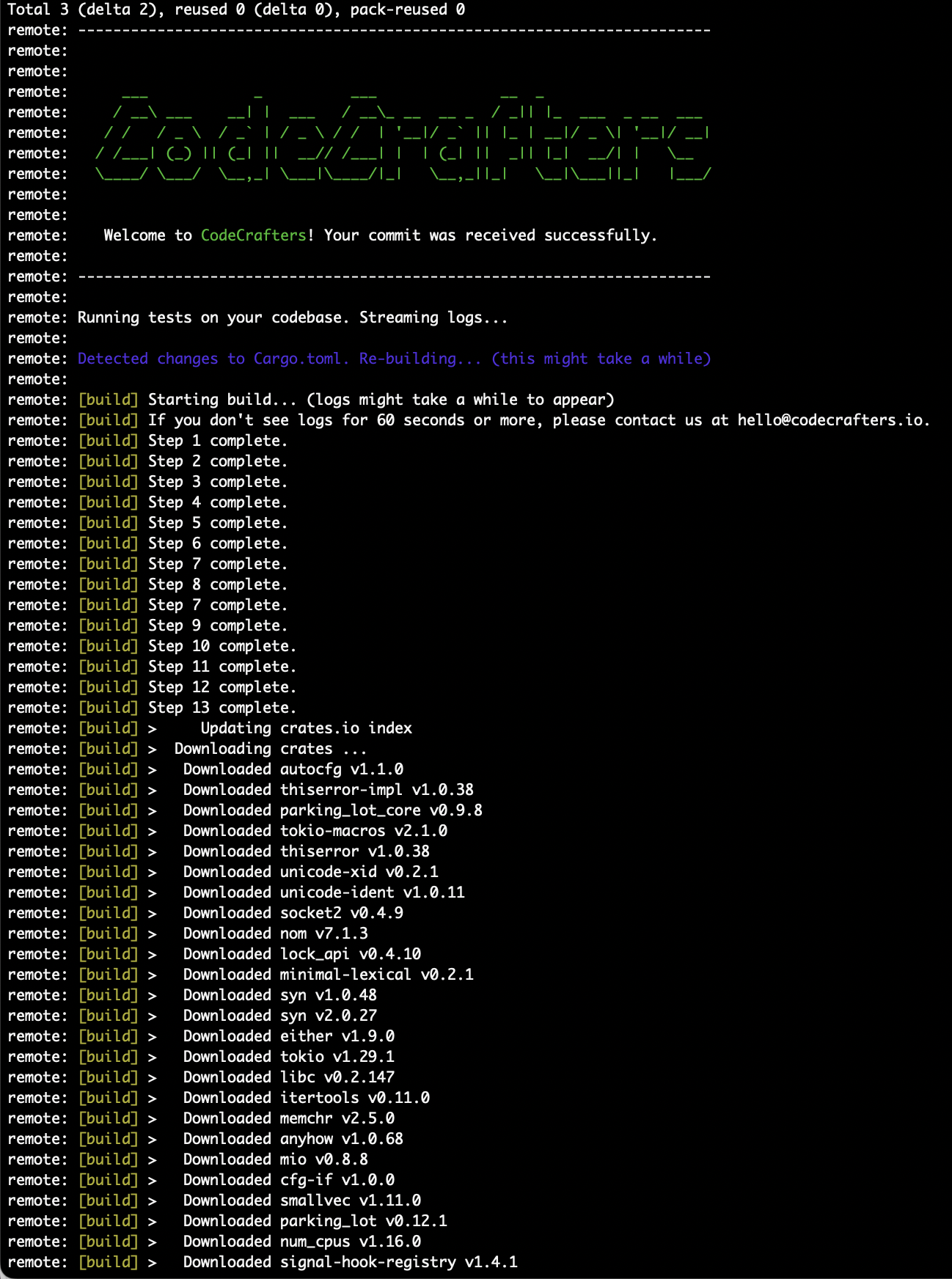
* Builds the test runner image.
* This step is only run it a test runner image doesn't exist already or is being re-built.
* Logs from this step are prefixed with `[build]`.
* Copies in user's latest code, if it has changed since the image was built.
* If any files in `CODECRAFTERS_DEPENDENCY_FILE_PATHS` have changed, triggers a re-build of the test runner image (i.e. back to step 1)
* Copies any files in `/app-cached` to `$CODECRAFTERS_SUBMISSION_DIR` if present.
* Sets `CODECRAFTERS_SUBMISSION_DIR` to `/app`
* This value is subject to change in the future, hence the use of an environment variable.
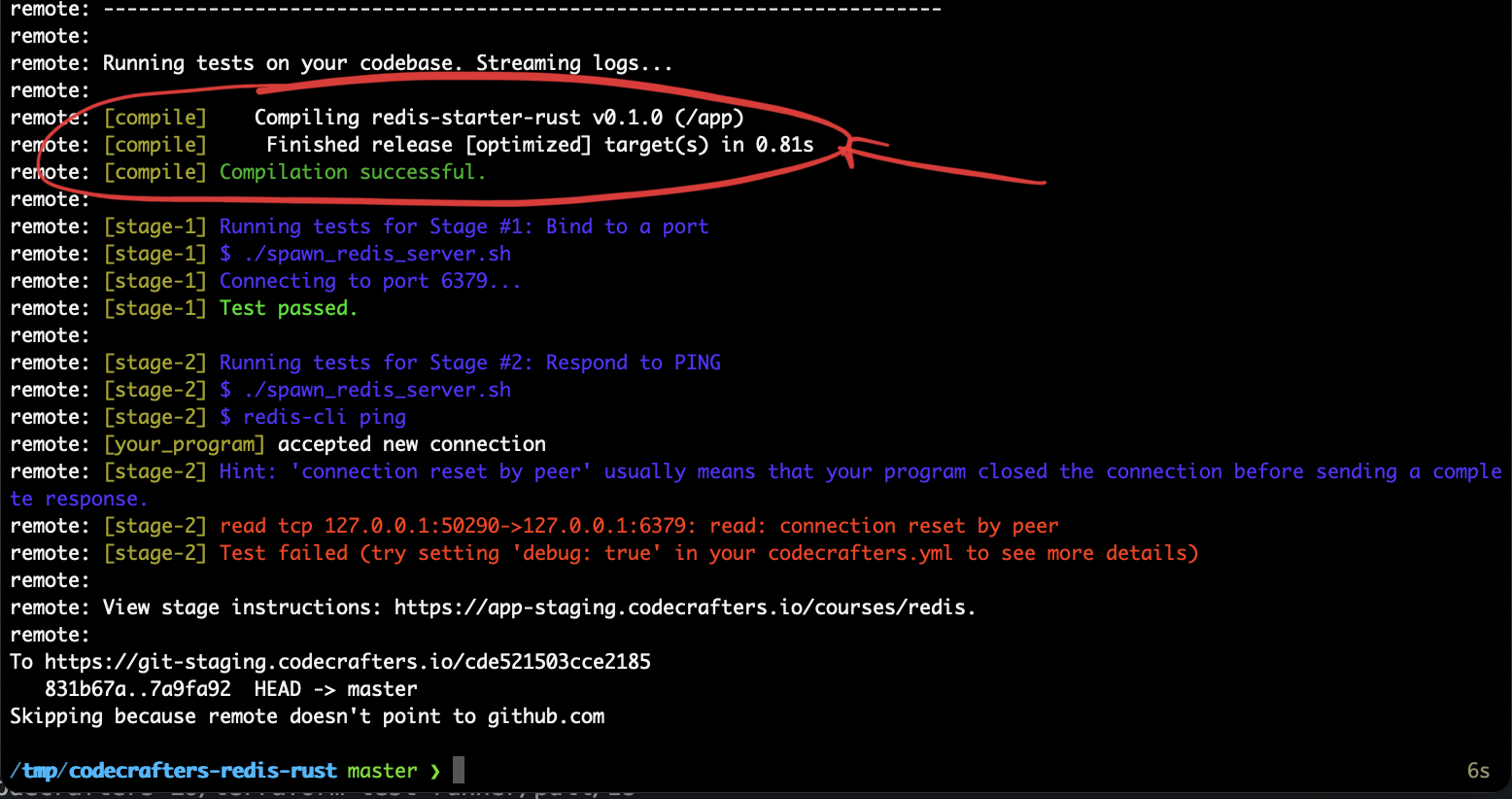
* Runs `/app/.codecrafters/compile.sh` if it exists.
* Logs from this step are prefixed with `[compile]`.
* This script only runs once even if we're testing multiple stages.
* Sets `CODECRAFTERS_TEST_CASES_JSON` based on the current test run.
* Runs the tester program ([example](https://github.com/codecrafters-io/redis-tester))
* Logs from this step are streamed directly with no prefix, the tester program is expected to add prefixes like "\[stage-1]", "\[stage-2]" etc. to its logs.
* The user's program is assumed to be present at `/app/.codecrafters/run.sh`.
* The exit code of this step (0 or 1) is used to determine if the test run passed or failed.
## Performance
We use three different techniques to ensure user's code is built & run as fast as possible. Depending on the language, you may not need to use all of these techniques.
### 1. Dockerfile Caching
The test runner will look for a `CODECRAFTERS_DEPENDENCY_FILE_PATHS` environment variable in the image. It will only re-build the image if the files listed in the variable change.
A Dockerfile can contain steps to install dependencies, like `cargo install` for Rust, and `npm install` for JavaScript.
Since files like `Cargo.toml` & `package.json` don't change often, this helps avoid re-installing dependencies on every run.
Any Dockerfile steps that emit output will be printed to the user's test run logs with the `[build]` prefix.
 **Notes**:
* If you want a Dockerfile step's output to not be included in `[build]` logs, you can add `> /dev/null` to the end of the command.
* If a `CODECRAFTERS_DEPENDENCY_FILE_PATHS` environment variable is not present, the test runner will never re-build the image.
### 2. Compilation
If the user's repo contains `/.codecrafters/compile.sh`, it will be run once before invoking the tester.
This is useful with compiled languages like Rust, where the first compilation can take a long time, but running the compiled binary is fast.
Logs from this script will be printed to the user's test run logs with the `[compile]` prefix.
**Notes**:
* If you want a Dockerfile step's output to not be included in `[build]` logs, you can add `> /dev/null` to the end of the command.
* If a `CODECRAFTERS_DEPENDENCY_FILE_PATHS` environment variable is not present, the test runner will never re-build the image.
### 2. Compilation
If the user's repo contains `/.codecrafters/compile.sh`, it will be run once before invoking the tester.
This is useful with compiled languages like Rust, where the first compilation can take a long time, but running the compiled binary is fast.
Logs from this script will be printed to the user's test run logs with the `[compile]` prefix.
 More on this in in [Test Runner Interface](/challenges/program-interface).
### 3. Cached Files
If any files are placed in `/app-cached`, they will be copied to `/app` folder (overwriting any of the user's code) before running the tester.
This can be used to store files required for incremental compilation in languages that support it.
More on this in in [Test Runner Interface](/challenges/program-interface).
### 3. Cached Files
If any files are placed in `/app-cached`, they will be copied to `/app` folder (overwriting any of the user's code) before running the tester.
This can be used to store files required for incremental compilation in languages that support it.